

Why MCP Over Grounding?
Most teams default to RAG/grounding pipelines when connecting external data to LLMs. For neighborhood intelligence, MCP is a better fit for two key reasons:Trustworthy by Design
Grounding relies on embedding similarity to retrieve chunks, and a wrong chunk can
surface a mismatched tax record, an outdated zoning law, or a neighboring parcel’s
data. MCP eliminates that risk: your agent calls a typed endpoint with explicit
coordinates, and the response is a single, authoritative record with source
attribution. No retrieval ambiguity.
Lower Cost
Grounding pipelines inject large context windows of retrieved documents into every LLM
call, and most providers charge a premium for grounding tokens. iHuus MCP tool calls
return compact, structured payloads (a score and a one-line description), adding
minimal input tokens. No extra LLM API surcharges, no bloated context windows.
Connection Details
Our MCP servers use Streaming HTTP (SSE) for transport. You need two things to connect:- Your API token (issued on your account dashboard).
- The server URLs for the intelligence domains you want to enable.
Available MCP Servers
We split tools into topical servers so you can grant your AI access only to the data it needs.The Tools Server
Most intelligence endpoints requirelat/lon coordinates, but users typically provide
street addresses or city names. The Tools server includes a geocoding endpoint that
converts free-text addresses into coordinates, enabling your agent to work with our APIs
out of the box.
By connecting the Tools server alongside any intelligence server, your agent can handle
the full workflow autonomously: receive an address from the user, geocode it, then query
the relevant intelligence dimensions, all without the user needing to provide coordinates.
Pre-built Extensions
Don’t want to wire up MCP servers by hand? The ihuus/mcp GitHub repository ships ready-to-use extensions for Claude Desktop and Gemini CLI — no backend code required.Claude Desktop
One-click
.mcpb bundle. Download, open, paste your API key — all 18 tools available
instantly.Gemini CLI
Per-domain or all-in-one extensions. Clone the repo and link with a single
gemini extensions link command.Quick Install
Claude Desktop — no clone needed:Example Output
The extensions include aneighborhood-analyst skill that produces structured,
multi-domain reports. Here is a sample output for 250 Mariposa Ave, Mountain View, CA
generated by Claude Desktop:
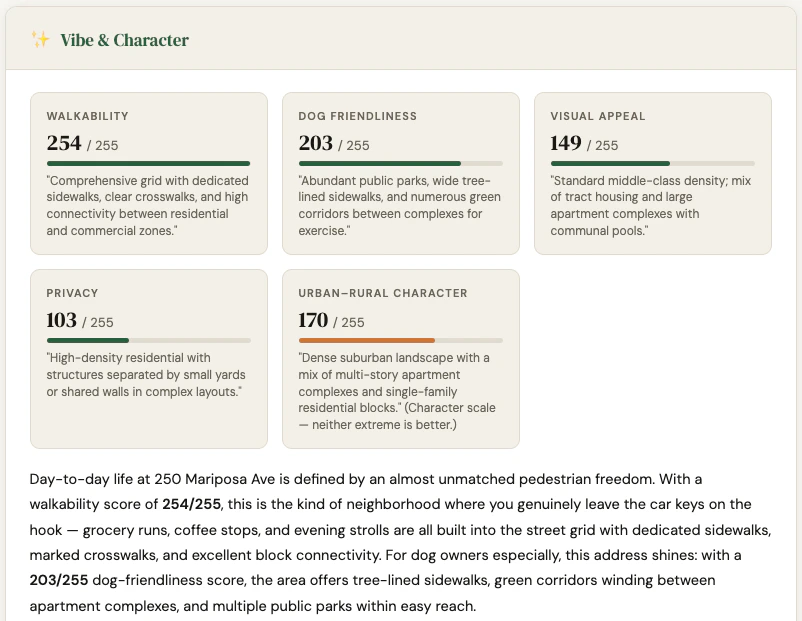
Full interactive report: static.ihuus.com/reports/neighborhood_report_250_mariposa_ave.html
Client Setup & Model Selection
These endpoints work with any modern MCP-compatible client: Open WebUI, Gemini Studio, GitHub Copilot, Claude Desktop, or your own custom agent.Model selection tip: Our tools return highly structured, semantic descriptions, so
fast “Lite” models (like Gemini 3.1 Flash Lite or Claude Sonnet 4.6) execute
tool calls rapidly and pass data to users efficiently. Larger “Pro” or “Deep Thinking”
models often overthink standard data lookups.
System Prompt
To get reliable results, constrain your agent’s behavior. LLMs will often hallucinate dummy coordinates if a user asks a vague question like “How are the schools in Texas?” The system prompt below forces the AI to rely strictly on iHuus data and ask for precise locations when needed.Testing Your Agent
Once your MCP servers are connected and your system prompt is applied, run through this conversation to verify the agent calls tools correctly: 1. Vague opener (agent should ask for a specific address, not hallucinate coordinates)“Hey, I’m moving to Mountain View, CA. How is it there?”2. Environment query (geocodes first via Tools, then triggers Environment server)
“I’ll be living near 250 Mariposa Ave. Is it noisy?”3. Schools query (triggers Schools server — districts lookup, then school search)
“My kids are 10 and 15. How good are the schools around that address?”4. Vibe query (triggers Vibe server)
“Will I be able to hear my neighbors, and is there a good place to walk my dog nearby?”5. Risk query (triggers Risk server)
“Are there any flood or fire risks I should know about?”6. Full neighborhood report (triggers all servers in parallel after geocoding — the best way to stress-test the full pipeline)
“Give me a complete neighborhood report for 250 Mariposa Ave, Mountain View, CA.”A well-configured agent should geocode the address once, then call all domain tools in parallel and return a structured report covering Vibe & Character, Environment, Demographics, Risk, and Schools.