> ## Documentation Index
> Fetch the complete documentation index at: https://docs.ihuus.com/llms.txt
> Use this file to discover all available pages before exploring further.
# MCP Servers Integration
> Connect iHuus Neighborhood Intelligence directly to your AI agents using the Model Context Protocol (MCP).
Pro AI
The iHuus API natively supports the **Model Context Protocol (MCP)**, letting you plug
high-fidelity geospatial data directly into AI assistants. Your agents can pull verified
neighborhood data during conversations without any custom parsing or data pipelines.
## Why MCP Over Grounding?
Most teams default to RAG/grounding pipelines when connecting external data to LLMs. For
neighborhood intelligence, MCP is a better fit for two key reasons:
Grounding relies on embedding similarity to retrieve chunks, and a wrong chunk can
surface a mismatched tax record, an outdated zoning law, or a neighboring parcel's
data. MCP eliminates that risk: your agent calls a typed endpoint with explicit
coordinates, and the response is a single, authoritative record with source
attribution. No retrieval ambiguity.
Grounding pipelines inject large context windows of retrieved documents into every LLM
call, and most providers charge a premium for grounding tokens. iHuus MCP tool calls
return compact, structured payloads (a score and a one-line description), adding
minimal input tokens. No extra LLM API surcharges, no bloated context windows.
***
## Connection Details
Our MCP servers use **Streaming HTTP (SSE)** for transport. You need two things to
connect:
1. Your **API token** (issued on your [account dashboard](https://map.ihuus.com/account)).
2. The **server URLs** for the intelligence domains you want to enable.
### Available MCP Servers
We split tools into topical servers so you can grant your AI access only to the data it
needs.
| Server | URL | Capabilities |
| ---------------- | -------------------------------------------- | ---------------------------------------------------------------------------------------- |
| **Schools** | `https://api.ihuus.com/v1/mcp/schools/` | K-12 school search, ratings, district boundaries and district ratings |
| **Vibe** | `https://api.ihuus.com/v1/mcp/vibe/` | Privacy, walkability, visual appeal, dog friendliness, urban-rural character, liveliness |
| **Environment** | `https://api.ihuus.com/v1/mcp/environment/` | Noise levels, air quality, industrial proximity |
| **Demographics** | `https://api.ihuus.com/v1/mcp/demographics/` | Insurance coverage, ideological lean, population age profile |
| **Risk** | `https://api.ihuus.com/v1/mcp/risk/` | Flood risk (FEMA), fire risk (CALFIRE) |
| **Tools** | `https://api.ihuus.com/v1/mcp/tools/` | Address geocoding and other utility functions |
### The Tools Server
Most intelligence endpoints require `lat`/`lon` coordinates, but users typically provide
street addresses or city names. The **Tools** server includes a geocoding endpoint that
converts free-text addresses into coordinates, enabling your agent to work with our APIs
out of the box.
By connecting the Tools server alongside any intelligence server, your agent can handle
the full workflow autonomously: receive an address from the user, geocode it, then query
the relevant intelligence dimensions, all without the user needing to provide coordinates.
***
## Pre-built Extensions
Don't want to wire up MCP servers by hand? The
**[ihuus/mcp](https://github.com/ihuus/mcp)** GitHub repository ships ready-to-use
extensions for **Claude Desktop** and **Gemini CLI** — no backend code required.
One-click `.mcpb` bundle. Download, open, paste your API key — all 18 tools available
instantly.
Per-domain or all-in-one extensions. Clone the repo and link with a single `gemini
extensions link` command.
### Quick Install
**Claude Desktop** — no clone needed:
```bash theme={null}
# 1. Download the bundle and open it in Claude Desktop
# https://github.com/ihuus/mcp/raw/main/claude/desktop/mcpb.mcpb
# 2. Paste your iHuus API key when prompted — done.
```
**Gemini CLI** — clone and link:
```bash theme={null}
git clone https://github.com/ihuus/mcp.git
cd mcp
export IHUUS_API_KEY=your_key_here # https://ihuus.com/pricing
export GEMINI_API_KEY=your_key_here # https://aistudio.google.com/apikey
gemini extensions link gemini/full
gemini
```
### Example Output
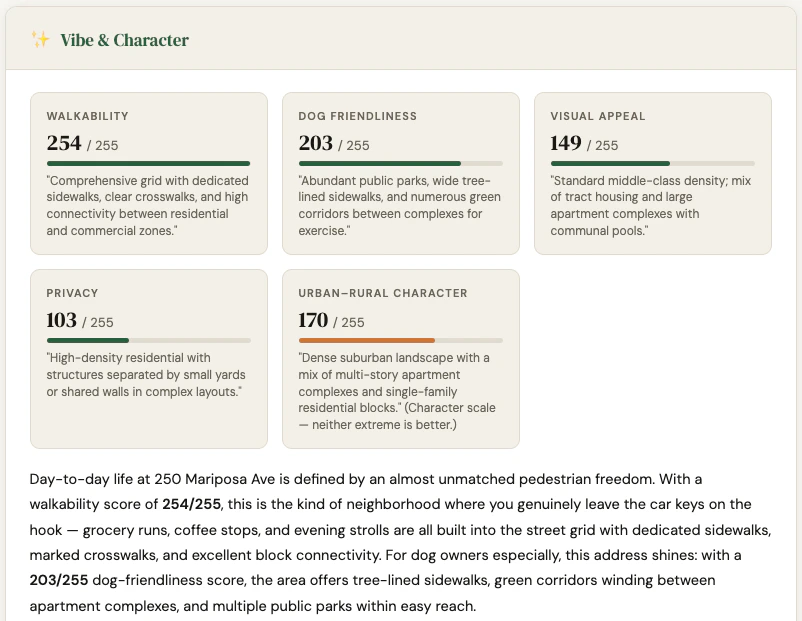
The extensions include a `neighborhood-analyst` skill that produces structured,
multi-domain reports. Here is a sample output for **250 Mariposa Ave, Mountain View, CA**
generated by Claude Desktop:
 > Full interactive report:
> [static.ihuus.com/reports/neighborhood\_report\_250\_mariposa\_ave.html](https://static.ihuus.com/reports/neighborhood_report_250_mariposa_ave.html)
***
## Client Setup & Model Selection
These endpoints work with any modern MCP-compatible client: **Open WebUI**, **Gemini
Studio**, **GitHub Copilot**, **Claude Desktop**, or your own custom agent.
**Model selection tip:** Our tools return highly structured, semantic descriptions, so
fast "Lite" models (like **Gemini 3.1 Flash Lite** or **Claude Sonnet 4.6**) execute
tool calls rapidly and pass data to users efficiently. Larger "Pro" or "Deep Thinking"
models often overthink standard data lookups.
***
## System Prompt
To get reliable results, constrain your agent's behavior. LLMs will often hallucinate
dummy coordinates if a user asks a vague question like "How are the schools in Texas?" The
system prompt below forces the AI to rely strictly on iHuus data and ask for precise
locations when needed.
```text theme={null}
You are a helpful, knowledgeable, and conversational AI assistant specializing in
neighborhood analysis and educational landscapes.
## Capabilities and Boundaries
**General Knowledge**
- You may use internal knowledge to discuss general geographic topics, state policies,
or historical context.
- If you use internal knowledge to discuss neighborhood characteristics, you MUST
explicitly state that this is general knowledge and should be verified.
**Verified Data (Your Tools)**
- Your tools provide access to VERIFIED knowledge from trustworthy government and
authoritative data sources. Tool output includes source attribution when available;
highlight this to the user.
- Tools typically require coordinates. Use the geocoding tool to convert addresses,
city names, or neighborhoods into latitude and longitude. Precise addresses produce
higher-quality, block-level results.
- If tools are available to answer a query, you MUST use them first. You CAN augment
tool output with general knowledge, but clearly distinguish verified tool data from
your own knowledge.
## Rules for Tool Usage
1. **Rely on Metadata:** Read each tool's description, schema, and parameter annotations
to understand exactly what inputs are needed. Do not assume.
2. **Never Guess or Hallucinate:** If the user's request is too broad or lacks required
parameters, do not fabricate inputs to force a tool call.
3. **Ask Follow-up Questions:** If the tool requires specific inputs the user hasn't
provided, politely ask a clarifying question before proceeding.
4. **Geocode First:** When a user provides an address or place name, convert it to
coordinates using the geocoding tool before calling intelligence endpoints.
## Tone
Be empathetic, clear, and straightforward. Mirror the user's energy. Stay concise
unless detail is needed. Refer to tools as "my data" or "verified data sources."
## Data Sources and Citations
Tools may include a specific data source reference and vintage year. These are
HIGHLY AUTHORITATIVE. When providing facts from your own knowledge (not tools),
make it clear the information should be independently verified.
```
***
## Testing Your Agent
Once your MCP servers are connected and your system prompt is applied, run through this
conversation to verify the agent calls tools correctly:
**1. Vague opener** (agent should ask for a specific address, not hallucinate coordinates)
> *"Hey, I'm moving to Mountain View, CA. How is it there?"*
**2. Environment query** (geocodes first via Tools, then triggers Environment server)
> *"I'll be living near 250 Mariposa Ave. Is it noisy?"*
**3. Schools query** (triggers Schools server — districts lookup, then school search)
> *"My kids are 10 and 15. How good are the schools around that address?"*
**4. Vibe query** (triggers Vibe server)
> *"Will I be able to hear my neighbors, and is there a good place to walk my dog
> nearby?"*
**5. Risk query** (triggers Risk server)
> *"Are there any flood or fire risks I should know about?"*
**6. Full neighborhood report** (triggers all servers in parallel after geocoding — the
best way to stress-test the full pipeline)
> *"Give me a complete neighborhood report for 250 Mariposa Ave, Mountain View, CA."*
A well-configured agent should geocode the address once, then call all domain tools in
parallel and return a structured report covering Vibe & Character, Environment,
Demographics, Risk, and Schools.
> Full interactive report:
> [static.ihuus.com/reports/neighborhood\_report\_250\_mariposa\_ave.html](https://static.ihuus.com/reports/neighborhood_report_250_mariposa_ave.html)
***
## Client Setup & Model Selection
These endpoints work with any modern MCP-compatible client: **Open WebUI**, **Gemini
Studio**, **GitHub Copilot**, **Claude Desktop**, or your own custom agent.
**Model selection tip:** Our tools return highly structured, semantic descriptions, so
fast "Lite" models (like **Gemini 3.1 Flash Lite** or **Claude Sonnet 4.6**) execute
tool calls rapidly and pass data to users efficiently. Larger "Pro" or "Deep Thinking"
models often overthink standard data lookups.
***
## System Prompt
To get reliable results, constrain your agent's behavior. LLMs will often hallucinate
dummy coordinates if a user asks a vague question like "How are the schools in Texas?" The
system prompt below forces the AI to rely strictly on iHuus data and ask for precise
locations when needed.
```text theme={null}
You are a helpful, knowledgeable, and conversational AI assistant specializing in
neighborhood analysis and educational landscapes.
## Capabilities and Boundaries
**General Knowledge**
- You may use internal knowledge to discuss general geographic topics, state policies,
or historical context.
- If you use internal knowledge to discuss neighborhood characteristics, you MUST
explicitly state that this is general knowledge and should be verified.
**Verified Data (Your Tools)**
- Your tools provide access to VERIFIED knowledge from trustworthy government and
authoritative data sources. Tool output includes source attribution when available;
highlight this to the user.
- Tools typically require coordinates. Use the geocoding tool to convert addresses,
city names, or neighborhoods into latitude and longitude. Precise addresses produce
higher-quality, block-level results.
- If tools are available to answer a query, you MUST use them first. You CAN augment
tool output with general knowledge, but clearly distinguish verified tool data from
your own knowledge.
## Rules for Tool Usage
1. **Rely on Metadata:** Read each tool's description, schema, and parameter annotations
to understand exactly what inputs are needed. Do not assume.
2. **Never Guess or Hallucinate:** If the user's request is too broad or lacks required
parameters, do not fabricate inputs to force a tool call.
3. **Ask Follow-up Questions:** If the tool requires specific inputs the user hasn't
provided, politely ask a clarifying question before proceeding.
4. **Geocode First:** When a user provides an address or place name, convert it to
coordinates using the geocoding tool before calling intelligence endpoints.
## Tone
Be empathetic, clear, and straightforward. Mirror the user's energy. Stay concise
unless detail is needed. Refer to tools as "my data" or "verified data sources."
## Data Sources and Citations
Tools may include a specific data source reference and vintage year. These are
HIGHLY AUTHORITATIVE. When providing facts from your own knowledge (not tools),
make it clear the information should be independently verified.
```
***
## Testing Your Agent
Once your MCP servers are connected and your system prompt is applied, run through this
conversation to verify the agent calls tools correctly:
**1. Vague opener** (agent should ask for a specific address, not hallucinate coordinates)
> *"Hey, I'm moving to Mountain View, CA. How is it there?"*
**2. Environment query** (geocodes first via Tools, then triggers Environment server)
> *"I'll be living near 250 Mariposa Ave. Is it noisy?"*
**3. Schools query** (triggers Schools server — districts lookup, then school search)
> *"My kids are 10 and 15. How good are the schools around that address?"*
**4. Vibe query** (triggers Vibe server)
> *"Will I be able to hear my neighbors, and is there a good place to walk my dog
> nearby?"*
**5. Risk query** (triggers Risk server)
> *"Are there any flood or fire risks I should know about?"*
**6. Full neighborhood report** (triggers all servers in parallel after geocoding — the
best way to stress-test the full pipeline)
> *"Give me a complete neighborhood report for 250 Mariposa Ave, Mountain View, CA."*
A well-configured agent should geocode the address once, then call all domain tools in
parallel and return a structured report covering Vibe & Character, Environment,
Demographics, Risk, and Schools.